# 激活多签钱包

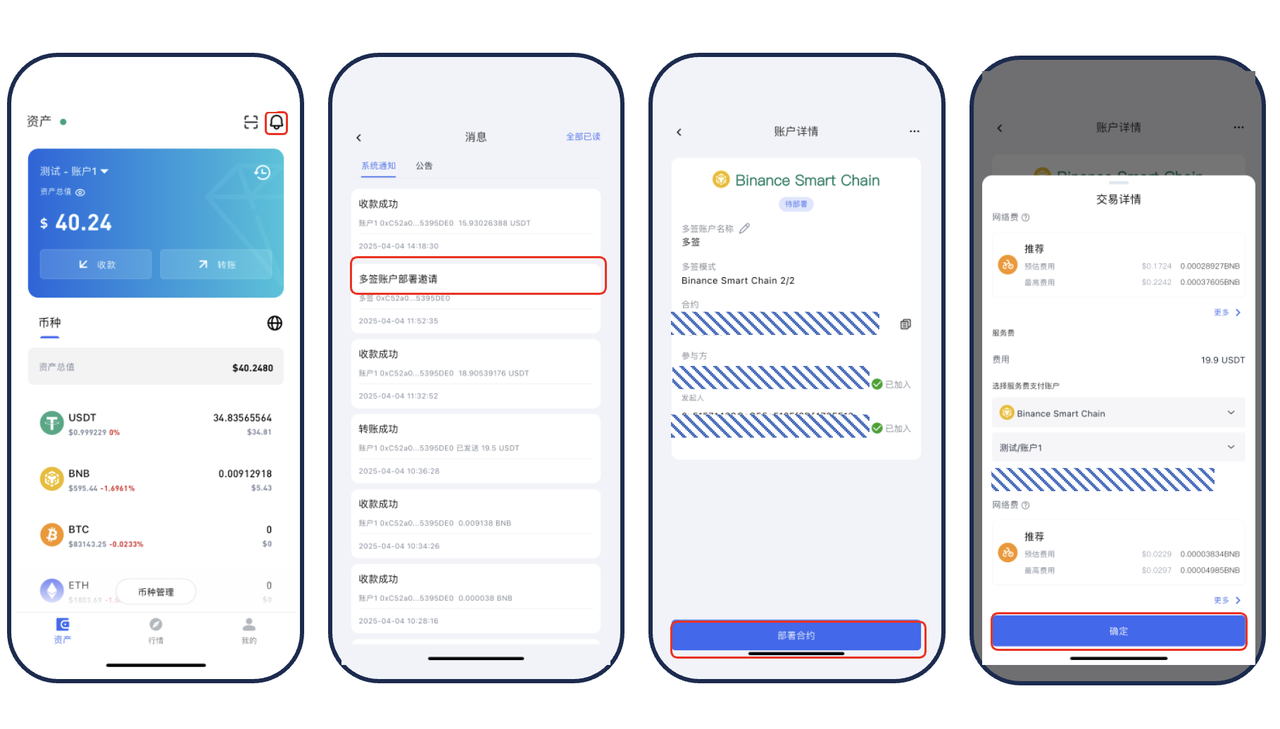
1. **设置最少签名人数** 在激活页面，设置多签的最少签名人数（默认至少 2 人），然后点击「确定」。
2. **发送邀请** 系统会向其他受邀参与者发送多签邀请函。
3. **部署合约** 受邀客户收到邀请后，需点击「部署合约」。
   1. 系统可能会弹出风险提示，请确认是您发起的多签请求。
4. **支付费用** 确认无误后，支付以下费用：
   1. 服务费：19.9 元；
   2. 网络手续费：根据当时网络情况实时计算。
5. **完成激活** 费用支付成功后，多签钱包即创建完成并可使用。

<figure><img src="/files/dRaz7uNHIZUCXBt4Qo1d" alt=""><figcaption></figcaption></figure>

<figure><img src="https://vdfc7kp4zh.feishu.cn/space/api/box/stream/download/asynccode/?code=NWQwOTQ5Y2QzZWRlNmNmNGZmYzMxYTQwNDJkZmJiNjNfcWRRbW5qbkxjSDhxclZkdktGQTBvb0hEbkxsMzhUOTZfVG9rZW46WExEWWI3dlNMb2tqbWl4M3lsY2NGNDNhbmVlXzE3NDQ0MjgzODk6MTc0NDQzMTk4OV9WNA" alt=""><figcaption></figcaption></figure>


---

# Agent Instructions: Querying This Documentation

If you need additional information that is not directly available in this page, you can query the documentation dynamically by asking a question.

Perform an HTTP GET request on the current page URL with the `ask` query parameter:

```
GET https://docs.77.im/ji-huo-duo-qian-qian-bao.md?ask=<question>
```

The question should be specific, self-contained, and written in natural language.
The response will contain a direct answer to the question and relevant excerpts and sources from the documentation.

Use this mechanism when the answer is not explicitly present in the current page, you need clarification or additional context, or you want to retrieve related documentation sections.