# 如何创建钱包

准备一个纸质笔记本，用于安全记录助记词。

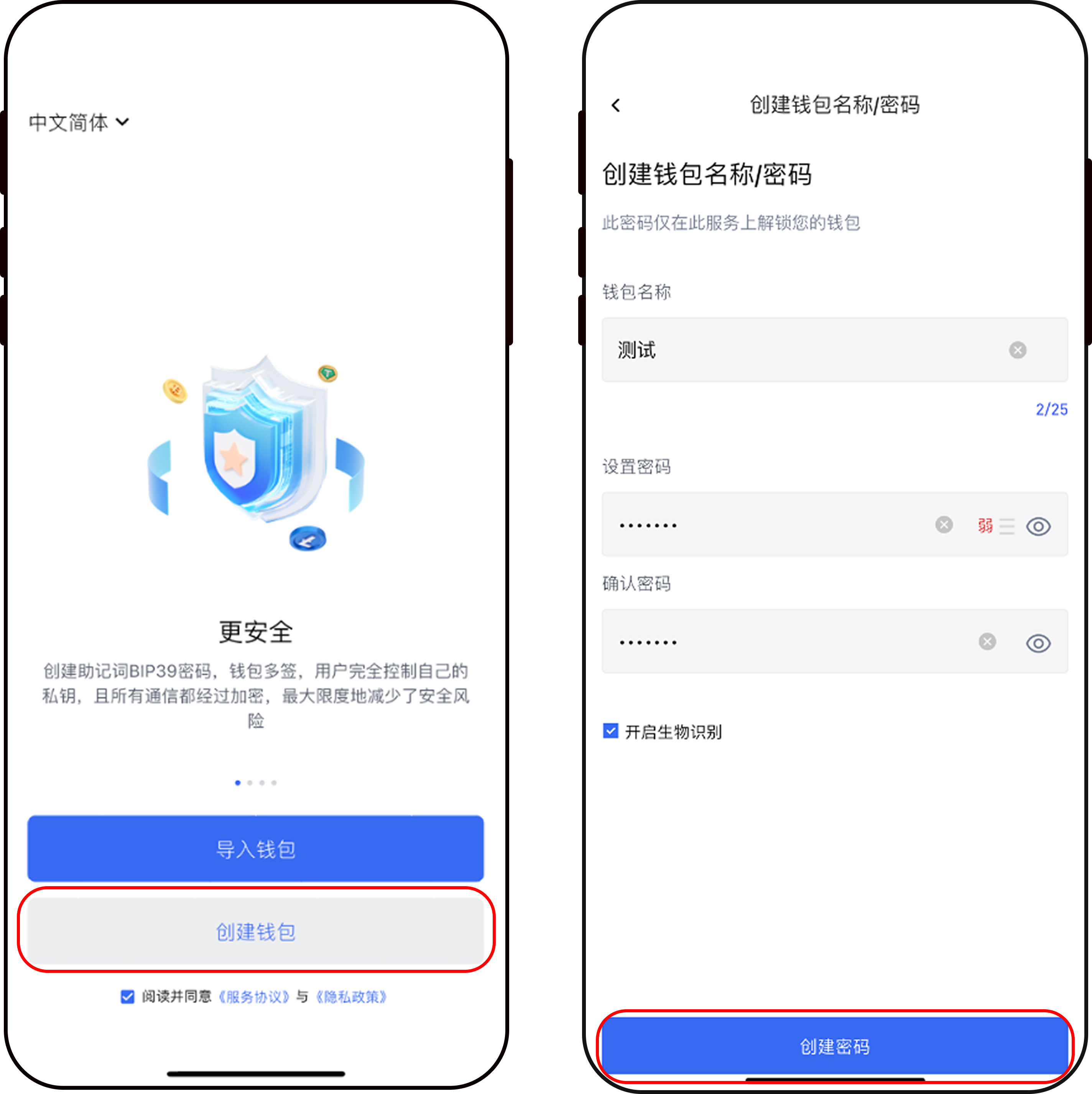
1. 下载并安装应用程序，打开后点击“阅读并同意”条款，然后选择“创建钱包”选项。
2. 为你的钱包输入一个自定义名称。
3. 设置一个由8位字母和数字组合而成的密码，确保其安全性并牢记。
4. 使用准备好的笔记本，认真记录下系统生成的助记词，并妥善保存。

<figure><img src="/files/kJ3hFP6ooWRAIuIL4Vum" alt=""><figcaption></figcaption></figure>

<figure><img src="https://vdfc7kp4zh.feishu.cn/space/api/box/stream/download/asynccode/?code=YjVjYzI2ZTRjODgxMGY0OWNhZjlmZjc1ZmJhYjczNTJfdFIweGduRXBGTGN6NENXTTRxNFlDVUxXTlJSVkt3VjZfVG9rZW46WW93Q2JxQ2JOb3l2QXJ4ZVJhVmMwYVZJbkxlXzE3NDQ0MjYzODc6MTc0NDQyOTk4N19WNA" alt=""><figcaption></figcaption></figure>


---

# Agent Instructions: Querying This Documentation

If you need additional information that is not directly available in this page, you can query the documentation dynamically by asking a question.

Perform an HTTP GET request on the current page URL with the `ask` query parameter:

```
GET https://docs.77.im/ru-he-chuang-jian-qian-bao.md?ask=<question>
```

The question should be specific, self-contained, and written in natural language.
The response will contain a direct answer to the question and relevant excerpts and sources from the documentation.

Use this mechanism when the answer is not explicitly present in the current page, you need clarification or additional context, or you want to retrieve related documentation sections.